Step 1: After logging into your account, you can browse through your courses at https://research.baps.org/courses/course-listing/
પગલું 1: એકાઉન્ટમાં લોગ-ઇન કર્યા પછી, આપે રજિસ્ટર કરેલા અભ્યાસક્રમો પર દૃષ્ટિ કરવા નીચે આપેલ લિંક પર ક્લિક કરો.
https://research.baps.org/courses/course-listing/
Step 2: Find the course you are interested in continuing and click Resume Course.
પગલું 2: આપ જે કોર્સને ચાલુ રાખવા માગતા હો તેને પસંદ કરો અને તે કોર્સને ફરી શરૂ કરવા ‘Resume Course’ પર ક્લિક કરો.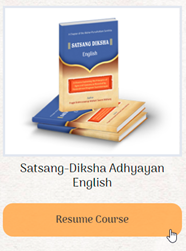
Step 3: After resuming the course, you will notice a side panel on the left that has a week-wise list of each of the classes. Click on one of the respective topics to open up video lectures, self-assessment quizzes or readings.
પગલું 3: કોર્સ ફરી શરૂ કર્યા પછી, આપ ડાબી બાજુની પેનલમાં દરેક અઠવાડિયા પ્રમાણે લેવાતા વર્ગોની સૂચિ દેખાશે. આપને રુચિકર વિડિઓ વ્યાખ્યાન કે સ્વમૂલ્યાંકન કસોટી (ક્વિઝને) અથવા વાંચન સ્વાધ્યાયને ખોલવા માટે તેના પર ક્લિક કરો.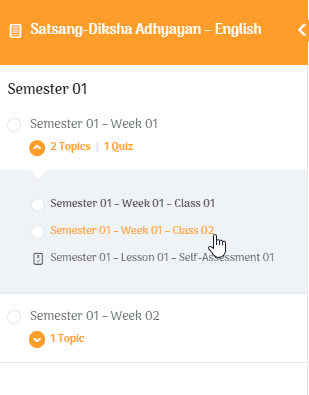
Step 4: If you want to see all the course content at once, click on the name of the course on the top section of the left panel.
પગલું 4: જો આપ એક જ સાથે તમામ અભ્યાસક્રમની સામગ્રી જોવા માંગતા હો, તો ડાબી પેનલના ઉપરના ભાગમાં કોર્સના નામ પર ક્લિક કરો.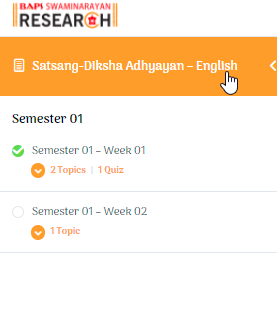
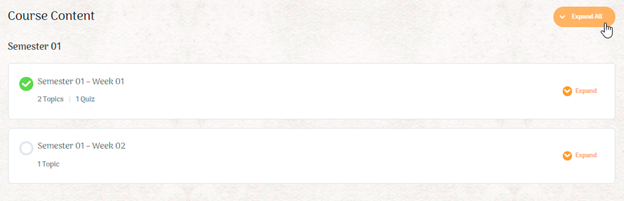
Step 5: You will be redirected to the overall course content page. If you scroll down, you can see all currently uploaded content.
પગલું 5: આપને કોર્સની સામગ્રીના પૃષ્ઠ પર લઈ જવામાં આવશે. જો તમે નીચે સ્ક્રોલ કરો, તો આપ હાલમાં અપલોડ કરેલી સામગ્રી જોઈ શકો છો.